If you want to book KTX tickets as a foreigner, the place to start is KORAIL’s English-language booking site for visitors to Korea. KTX is Korea’s high-speed train, and KORAIL is the national railway operator that runs it. Booking is usually straightforward, but a few details trip up first-time visitors: choosing the wrong station, assuming an overseas card will always go through, and mixing up a rail pass with a seat reservation.
This guide walks through the booking sequence, the rules to check before you pay, what to try if a card is declined, how KORAIL PASS fits in, and what to do if the website will not cooperate. Throughout, it separates what KORAIL and other official sources actually confirm from what traveler guides merely report, so you know where to double-check before you pay.
Table of Contents
1. Can Foreigners Book KTX Tickets Online?
Yes. KORAIL runs an English-language booking site at korail.com/global/eng. According to SBS News’s report on a Ministry of Land, Infrastructure and Transport and KORAIL announcement, the webpage for foreigners supports seven languages, including English, Chinese, Japanese, Thai, and Vietnamese, and the ministry plans to add three more by the end of this year. A KORAIL notice for foreign visitors explains why this matters: station counters can be crowded, and installing a separate app is a hassle for someone staying only briefly. KORAIL’s answer is a multilingual ticketing site that accepts overseas cards, reachable by QR codes placed in major stations.
The same notice acknowledges that KORAIL’s own mobile app, KORAIL Talk, can also be used for booking. It does not say whether foreign cards work in that app, so this guide focuses on the website.
Korean phone number and ID: what the sources do not say
The KORAIL pages and the news report cited here do not state whether a Korean phone number, Korean ID, or local identity verification is required on the English site. Some traveler guides say the foreigner flow works without them, but that is not an official statement. Treat it as unconfirmed until you see the actual booking screens. If a step asks for something you do not have, jump to the fallback options below instead of guessing or trying to work around it.
Traveling for a concert? This guide covers only the train. For concert tickets, see How Foreign Fans Can Buy K-Pop Concert Tickets in Korea 2026.
2. How to Book KTX Tickets Step by Step
Button and field names on KORAIL’s site can change, so this sequence describes the stages rather than quoting labels. Before you start, note KORAIL’s own service guidance: it recommends Chrome, Samsung Internet, or Safari, and a wired connection or an LTE/5G mobile network. It says Wi-Fi on the move may disconnect, recommends Android 12 or iOS 16 or later, and warns that opening the site inside social-media or portal apps may not work properly. Booking from a stable connection in your hotel is the safest option.
- Open the English site. Start from KORAIL’s English page, or scan a KORAIL QR code at a major station.
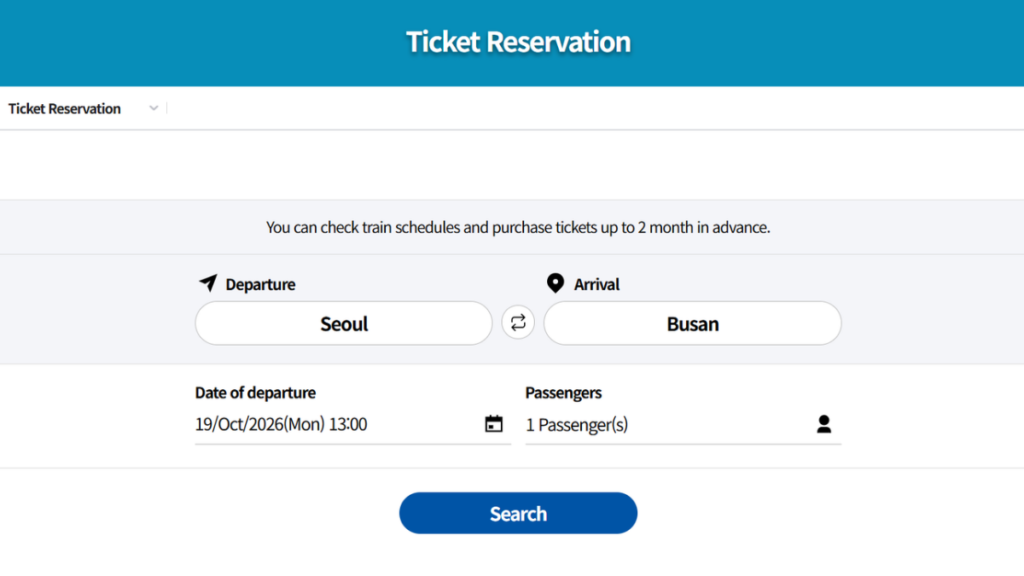
- Enter your trip. Choose the departure station, arrival station, travel date, and number of passengers. Pick the specific station name shown in the results rather than only the city, because a large city can have more than one station.
- Choose a train and seat class. The options you see depend on the train and on remaining availability.
- Enter passenger details. Follow the passport-name advice in the next section.
- Pay with an overseas card. Which card networks the checkout accepts can vary, so see the card section below.
- Save your booking. Keep whatever retrieval details the site gives you, such as a reservation number, or the email and password you used if it asked for them. If you arrived through a station QR code, KORAIL suggests bookmarking that page so you can check your ticket later.
A map app helps you plan how to reach your departure station; see How to Use Naver Map and KakaoMap in English in Korea.
Make sure you are buying KTX, not SRT
Seoul has more than one high-speed departure point, and they are not all run by the same company. KTX is operated by KORAIL, and the Seoul-area KTX stations most travelers use are Seoul Station and Yongsan Station. A separate high-speed service, SRT, is operated by a company called SR and departs from Suseo Station in southeastern Seoul, according to The Korea Times and Railway Gazette’s Railway Journal. A traveler guide such as Wikivoyage describes the same split. Practically, that means a ticket you buy on KORAIL’s site is for a KORAIL train, and an SRT ticket is bought through SR instead. Service patterns can change over time, so check the train type and operator on the search results rather than inferring them from the station name alone.
3. KTX Booking Rules Foreigners Should Know
Advance booking window
Korea has extended how far ahead rail tickets can be booked, but KORAIL’s own pages have not been fully consistent. A longer window helps if you are building an itinerary around fixed dates such as a concert, because you can lock in a train earlier. Use the dates the booking screen actually offers as the deciding factor.
| Source | What it says | How to use it |
|---|---|---|
| SBS News (citing the Ministry and KORAIL) | From October 1, 2026, the advance booking period for rail tickets such as the KTX expanded from one month to two months before departure. | Reliable news report of the announcement. It does not break the rule down by ticket type. |
| KORAIL English reservation page | As of our October 19, 2026 review, it states that tickets can be bought up to two months ahead. | Matches the announcement. Confirm on the live booking screen for your train. |
| KORAIL English ticketing guide page | As of the same review, it still says up to one month before travel. | Likely older wording, but this is not confirmed. If the two pages disagree, rely on what the booking screen lets you select. |
Overseas cards
SBS reports that foreign visitors can buy tickets with overseas credit cards such as Visa, Mastercard, and UnionPay, and that support for WeChat Pay and Alipay was still under development. Do not assume every card will work. Acceptance can depend on your card issuer and on the checkout screen you see on the day, and the sources reviewed do not list a complete set of accepted card networks. If you travel with more than one card, plan to bring a second one from a different network or issuer.
Passport name
The KORAIL pages reviewed do not spell out name-matching rules. Entering your name exactly as printed in your passport is a low-risk habit, and carrying the passport during your trip is sensible in case staff need to check your details. This is practical advice, not a stated KORAIL requirement.
Time zone
Korea uses Korea Standard Time (KST), which is UTC+9. When you book from abroad, double-check that you are reading departure times as KST and not converting them to your home time twice.
4. What to Do If Your Foreign Card Is Declined
KORAIL does not publish a decline-reason list in the pages reviewed. The causes below are commonly reported by traveler guides, so treat them as likely explanations rather than confirmed rules. The cheapest fix is to prepare before you travel: contact your issuer, confirm online international payments work, and keep a backup card. For general background, see Foreign Credit Cards in Korea: How to Pay and Withdraw Cash.
| Symptom | Possible cause | What to try |
|---|---|---|
| Payment fails or is declined at checkout | Your bank may not have enabled online international payments or 3-D Secure (the extra verification step some banks require) for the card. | Contact your card issuer to confirm online international payments and 3-D Secure are active, then try again. |
| The card is not accepted or not recognized | The checkout may not support your card network. | Try a different overseas card, or use a fallback option in the next section. |
| The page freezes or behaves oddly | An unsupported browser, a weak connection, or opening the site inside another app, as KORAIL’s service guidance warns. | Reopen the site in Chrome, Samsung Internet, or Safari on a stable connection. |
Some banks send a verification prompt to your phone or banking app during an online payment. That is the usual form 3-D Secure takes, according to traveler guides, but KORAIL’s pages reviewed do not describe it. If you will be abroad with a travel eSIM or without your home number, check beforehand how your bank delivers such prompts and whether you can approve them from the banking app, so a missing text message does not block your purchase. If a payment fails, avoid rapidly retrying the same card several times; stop, check your bank app for alerts, and then decide whether to retry or switch cards. This is general good practice rather than a KORAIL rule, and it works for any online purchase from abroad.
5. KORAIL PASS vs. Individual KTX Tickets
The KORAIL PASS is a multi-day pass for unlimited rail travel. Reseller product pages describe it as sold to foreign visitors only, but KORAIL’s own eligibility page was not confirmed for this guide, and eligibility for foreign residents of Korea is not established here. The key planning point is that a pass and a seat are separate things: a pass is your right to ride, while a seat reservation assigns you a place on a specific train.
| Topic | KORAIL PASS | Individual ticket |
|---|---|---|
| Who it is for | Described by resellers as for foreign visitors. Official eligibility not confirmed; resident eligibility unconfirmed. | The sources reviewed do not state any nationality restriction for ticket purchases on KORAIL’s site. |
| Seat | A pass does not itself assign a seat. Some reseller pages recommend reserving one, and some say standing or unreserved travel is allowed if you cannot. KORAIL’s rule was not confirmed, so do not plan around having no seat. | You pick a specific train when you book. Seat options depend on the train and availability. |
| Reseller-reported limits | Two resellers state that pass holders can make seat reservations twice per day and that the pass is non-transferable. These are not KORAIL statements; verify before relying on them. | Not applicable. |
| Best use | Check the pass terms and seat-reservation process before buying. | Simple for one or two planned journeys. |
If you will take only a couple of long trips, compare the total cost of individual tickets against the pass, and confirm the seat-reservation steps before you pay for the pass. For event days or busy weekends, reserve seats as early as the booking window allows.
6. What to Do If Online Booking Does Not Work
Your options differ in who sets the rules, so compare them before you switch. The first step is usually the simplest: try again on a stable mobile connection in a recommended browser, then try a different card. If that fails, these channels are the fallbacks.
| Channel | What is confirmed | What to check |
|---|---|---|
| KORAIL official website | Accepts overseas cards. At major stations, QR codes lead to the multilingual site, so you can book on your phone on the spot. | The QR notice does not name specific stations and may be older than the current setup. Look for the codes rather than assuming they are everywhere. |
| Station ticket office | KORAIL’s notice confirms staffed counters exist, and notes they can be crowded, so waiting may take time. | The sources reviewed do not state which documents or payment methods a counter accepts. Ask staff, and carry your passport and card. Some traveler guides mention machines for foreign cards at major stations; this was not confirmed by KORAIL. |
| Third-party resellers such as Klook, KKday, or Trip.com | They sell KTX tickets as a separate service from KORAIL. | Fees, cancellation terms, ticket delivery, and how the ticket works at the gate may differ from a ticket bought directly from KORAIL. Read the seller’s terms first. |
A practical way to choose between these channels is to ask what each one can still fix for you. If the problem is your card, a second card or a call to your issuer usually solves it, and the official site remains your best route because KORAIL itself sets the refund and change terms. If the problem is that a page will not load or a step asks for details you cannot provide, a station ticket office lets you explain the situation to a person, although you should expect possible queues. A reseller can be convenient when you want to pay in your own language or currency, but you are then relying on the seller’s terms, so read how it handles cancellations, changes, and ticket delivery before you pay. Whichever route you pick, screenshot or save your confirmation and keep your passport with you on travel day.
7. Before You Board: KTX Ticket Checklist
KORAIL’s pages reviewed do not describe gate procedures in detail, and they may differ by station. If a gate does not accept your ticket, ask station staff for help. Run through the list below the day before and again before you leave for the station.
| # | Action | Done |
|---|---|---|
| 1 | Confirm the passenger name matches your passport. | ☐ |
| 2 | Check that the departure and arrival stations are the exact stations you intend, not just the right city. | ☐ |
| 3 | Confirm the ticket shows KTX (not SRT), the correct date, departure time, train, car, and seat. | ☐ |
| 4 | Save your retrieval details and, if you used a station QR code, the bookmarked page. | ☐ |
| 5 | Carry your passport and have the ticket ready on your phone or in print. | ☐ |
| 6 | Check the departure time in KST. | ☐ |
| 7 | Charge your phone, or print the ticket if you prefer a paper backup. | ☐ |
| 8 | Allow extra time at the station in case you need staff help. | ☐ |
Why these checks matter: a ticket for the wrong station, the wrong train type, or the wrong date is the most common avoidable problem, and it is easiest to fix before departure. Checking the departure time in KST prevents confusion if your phone is still set to your home time zone. Having the ticket available both on your phone and, if you choose, in print protects you from a dead battery. KORAIL’s notice also suggests bookmarking the page you used to book, because that is how you return to your ticket later. If something looks wrong on the ticket, contact KORAIL through its official channels or ask station staff before the train departs, since changes may be limited once you are on the platform. Rules for changes and refunds were not confirmed for this guide, so check them on KORAIL’s site before you pay.
Arriving from the airport first? See Incheon Airport to Seoul Station: AREX vs Airport Bus vs Taxi to plan that leg.
8. Sources and Official Links
- KORAIL English website (official)
- KORAIL English reservation page (official)
- KORAIL English ticketing guide (official)
- KORAIL notice on QR-code ticket booking for foreign visitors (official, Korean)
- SBS News: KTX Tickets Available Two Months in Advance Starting October 1 (news report)
- The Korea Times: SRT to start operation next month (news report, 2016)
- Railway Journal: Korea opens Suseo high-speed line (trade press, context only)
- Wikivoyage: KTX (travel wiki, context only)
- Seoul Travel Pass KORAIL PASS listing (reseller, context only)
- iVisitKorea Korea Rail Pass page (reseller, context only)
Last reviewed: October 19, 2026