304 North Cardinal St. Dorchester Center, MA 02124
NOL World K-Pop Ticketing Guide for Foreign Fans (2026)
Master the 2026 global K-pop ticketing workflow on NOL World with this comprehensive international guide.
Attending a live K-pop concert or a musical in South Korea is a dream for millions of fans worldwide. From the deafening roar of fan chants to state-of-the-art stage production, seeing a show live in Seoul is unforgettable. However, for fans living outside South Korea, actually securing a ticket can feel like navigating a high-stakes obstacle course.
Over the years, the platform international fans know as “Interpark Global” has evolved considerably. In 2026, the foreign ticketing pathway for Interpark’s global service runs through NOL World (world.nol.com). While NOL World offers a dedicated international gateway in English, Japanese, and Chinese, navigating its account system, anti-scalping identity checks, global payment gateways, and strict venue pickup rules takes careful preparation. A single misspelled letter on your profile or an unverified credit card can cost you your dream seat in seconds.
Whether you are chasing tickets for BTS, BLACKPINK, SEVENTEEN, Stray Kids, TWICE, or a top-tier Daehangno musical, this master guide walks you through every phase of the ticketing process. Written by the senior editorial team at kparadiseguide.com, this step-by-step tutorial, pro-tips breakdown, and policy decoder will get you 100% ready to secure your seat.
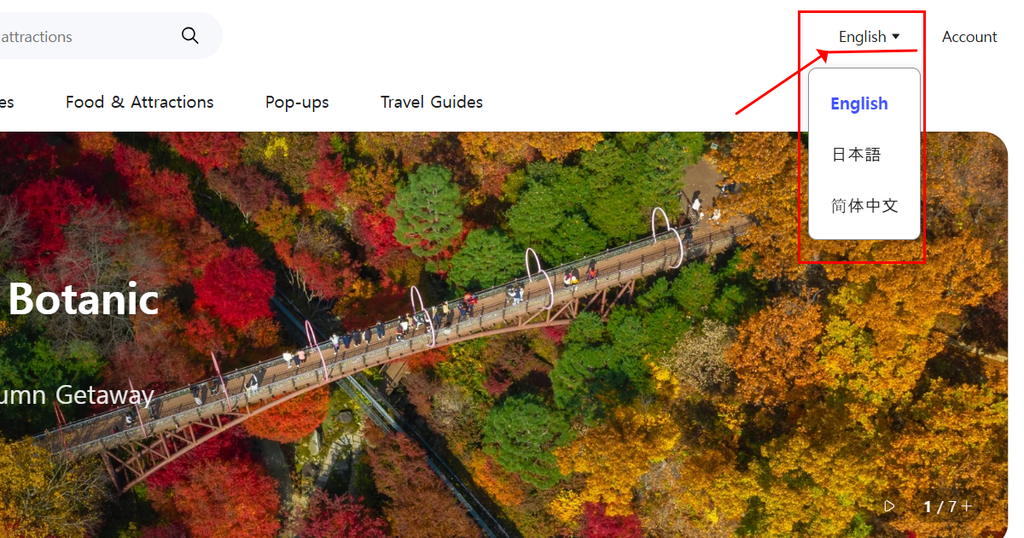
NOL World Global platform language selector (English, Japanese, Chinese)
※Looking to access the platform right away? You can jump straight to the official site below, or follow our step-by-step guide to secure your seat successfully
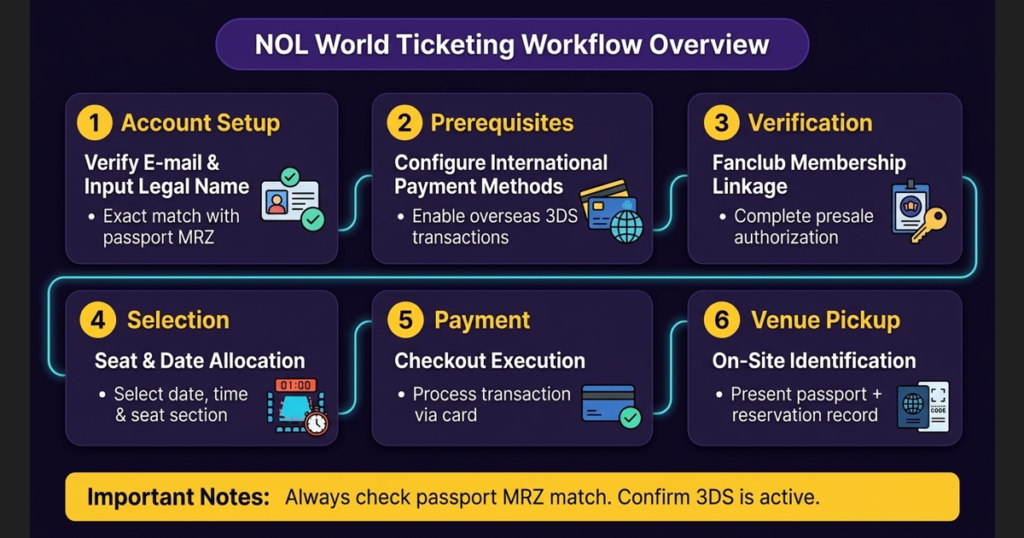
Complete presale authorization within the designated window
4
Selection
Seat & Date Allocation
Select date, time, and seat section before countdown expires
5
Payment
Checkout Execution
Process transaction via pre-authorized international card
6
Venue Pickup
On-Site Identification
Present original physical passport + reservation record
NOL World 2026 K-pop Ticketing Workflow: 6-Step Summary Guide
The 2026 International Ticketing Pathway
Historically, foreign fans accessed Interpark’s overseas sales through the Interpark Global portal. Today, that route runs exclusively through NOL World’s global ticket service.
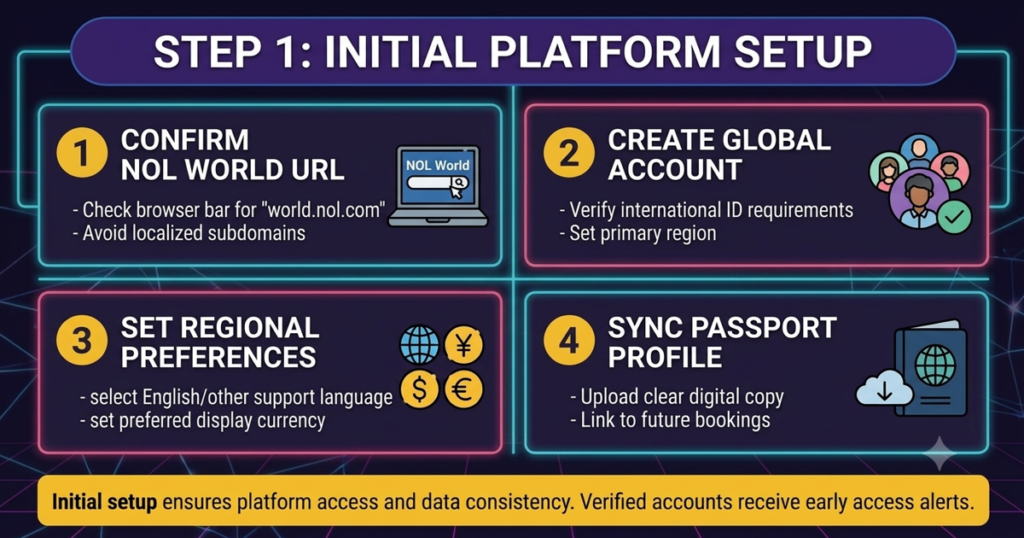
Platform Verification: Foreign buyers must first confirm whether an event is listed for global sale on world.nol.com. Keep in mind that not every concert on the domestic Korean NOL Ticket site is opened up for global sales. If a show is hosted exclusively on domestic channels, foreign accounts without local registration credentials or a domestic mobile number cannot complete a booking.
Account Structure: Foreign accounts are email-based and built specifically for overseas users without a Korean domestic registration number. That said, individual concert organizers can still impose their own identity verification rules, fan club presale requirements, and per-person purchase limits.
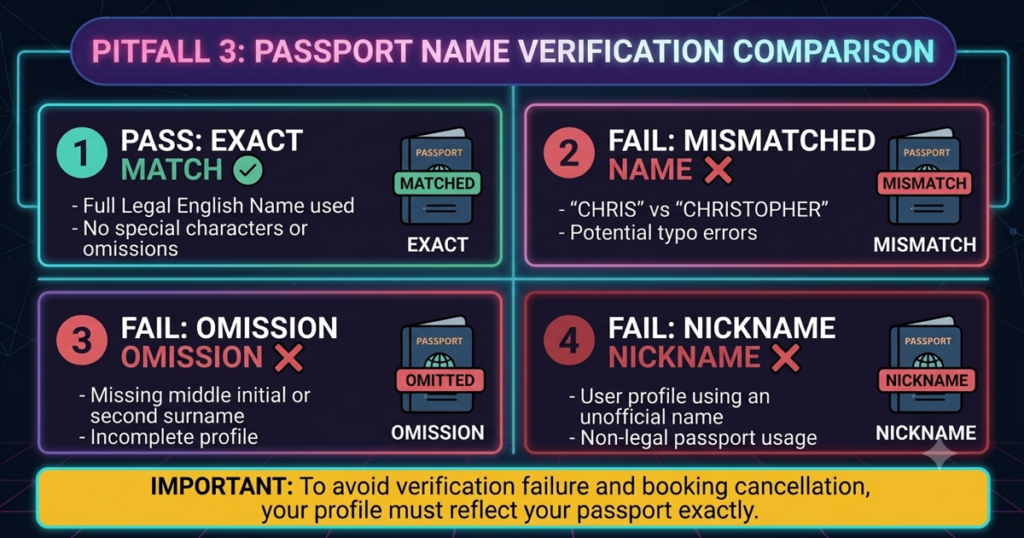
Passport Matching Rule (Zero Tolerance): Your account’s full English name must match your passport letter-for-letter. Abbreviations, omitted middle names, nicknames, or spelling and spacing mismatches will lead to instant rejection during identity verification at the venue on show day.
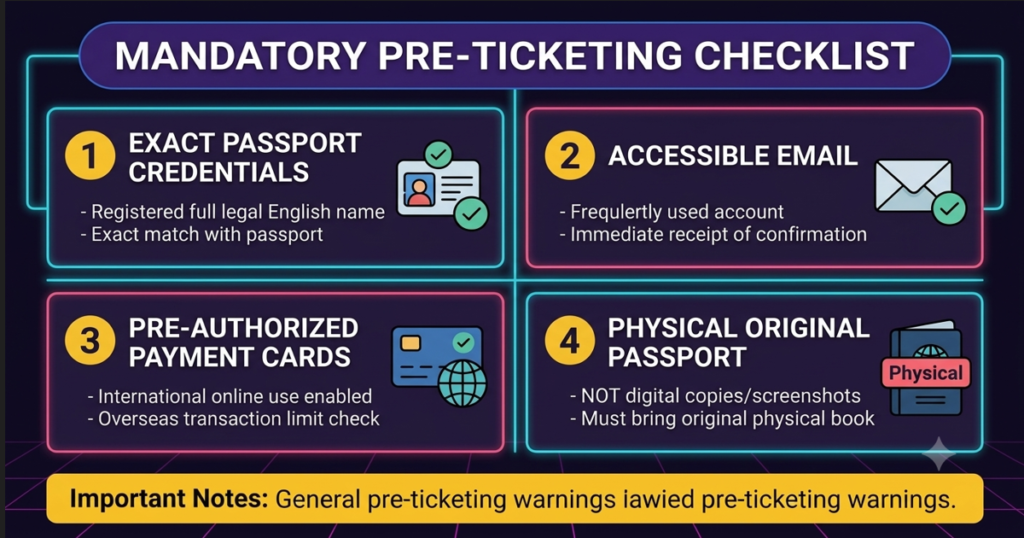
Mandatory Pre-Ticketing Checklist
Avoid last-minute panic by gathering and configuring the following well before ticket sales open:
Exact Passport Credentials: An active NOL World account registered under your full legal English name, exactly as printed on your passport.
Accessible Email and Booking Confirmation: A regularly checked email account that can instantly receive verification links, password resets, and booking numbers.
Pre-Authorized Payment Cards: Credit or debit cards explicitly enabled for overseas online transactions and equipped with 3-D Secure (3DS) authentication.
Physical Original Passport: Your unexpired physical passport (photocopies, digital scans, and mobile screenshots are strictly rejected at Korean venues).
Mandatory Pre-Ticketing Checklist for NOL World 2026
Payment Method Nuance
While general ticketing guides tend to emphasize Visa and Mastercard as the safest options, NOL World supports a range of payment gateways—including Visa, Mastercard, American Express, JCB, and PayPal—depending on the specific event. Always check the live checkout screen for your show to confirm supported methods in advance.
Fanclub Presale Mechanics
Getting Fanclub Presale access takes more than simply buying an artist’s official membership.
Pre-Verification Windows: Concert notices typically set a strict, limited window during which fans must link their official Fanclub details (via Weverse or another official fan platform) to their NOL World account.
Separate Schedules: Treat Fanclub verification deadlines, Fanclub presale opening times, general sale opening times, and per-person purchase limits as entirely separate events. Missing the pre-verification deadline means losing presale eligibility—even with an active fan club membership.
2. Step-by-Step Procedure: Booking Your Ticket
Follow this reservation sequence closely to maximize your chances during high-demand booking sessions.
Navigate to world.nol.com and switch the interface to your preferred language (English, Japanese, or Simplified/Traditional Chinese).
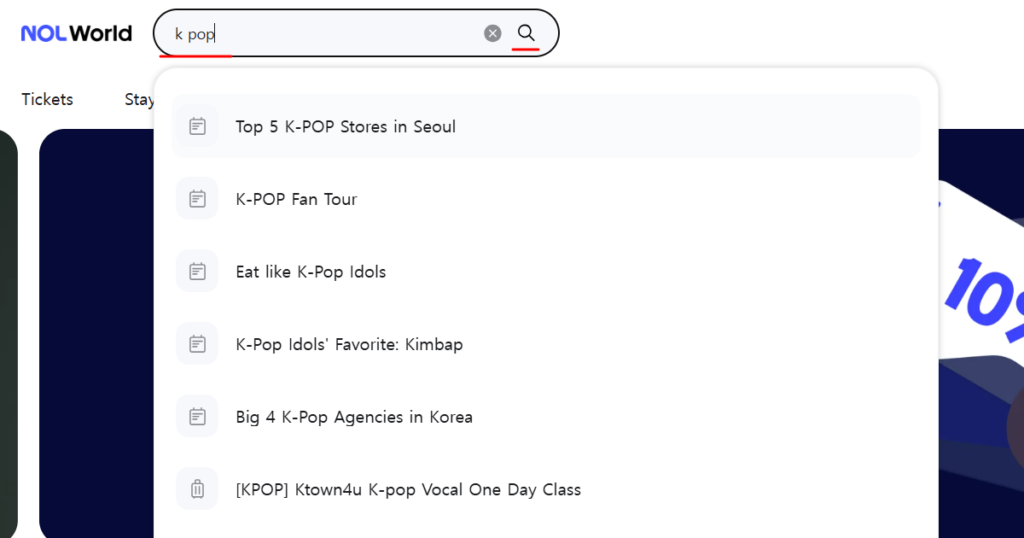
Enter the exact artist or show title into the search bar.
Open the event details page and review the essential parameters:
Concert dates and performance times.
Ticket opening time (always listed in Korea Standard Time — KST, UTC+9).
Ticket purchase limits per account or per person (e.g., maximum 1 or 2 tickets per show).
Identity verification, Fanclub presale notices, ticket pickup, and cancellation guidelines.
Troubleshooting Missing Events: If an event appears on the domestic NOL Ticket page but returns no results on NOL World, no global allocation exists. Check the artist’s or promoter’s official social channels to see whether an alternative international ticketing vendor has been designated instead.
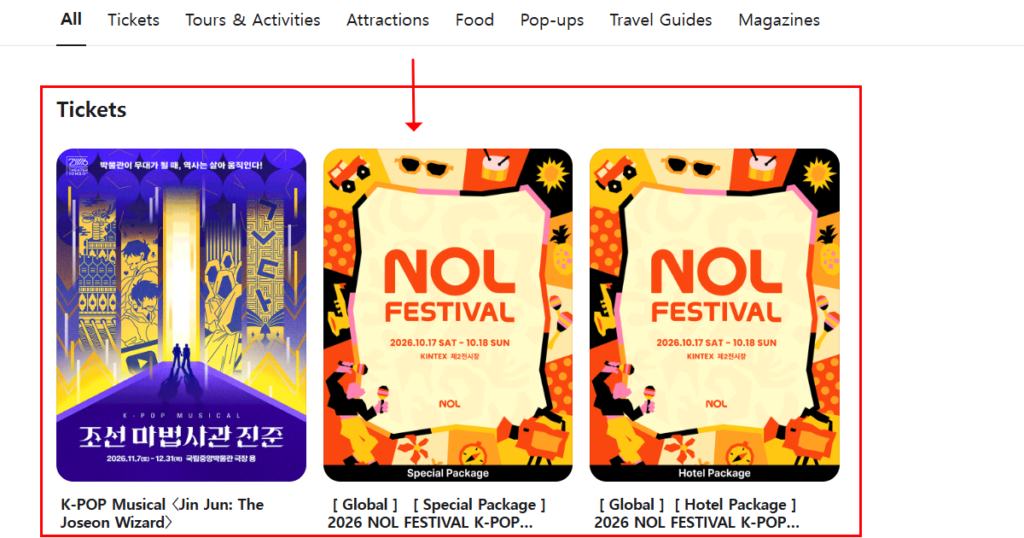
Search results screen for K-pop concerts on the world.nol.com platformSearch results screen for K-pop concerts on the world.nol.com platform
Step 2: Account & System Configuration
Create your account days or weeks ahead of the sale, and complete email confirmation right away.
Double-check that your profile name matches your passport letter-for-letter, and test your login and password recovery process ahead of time.
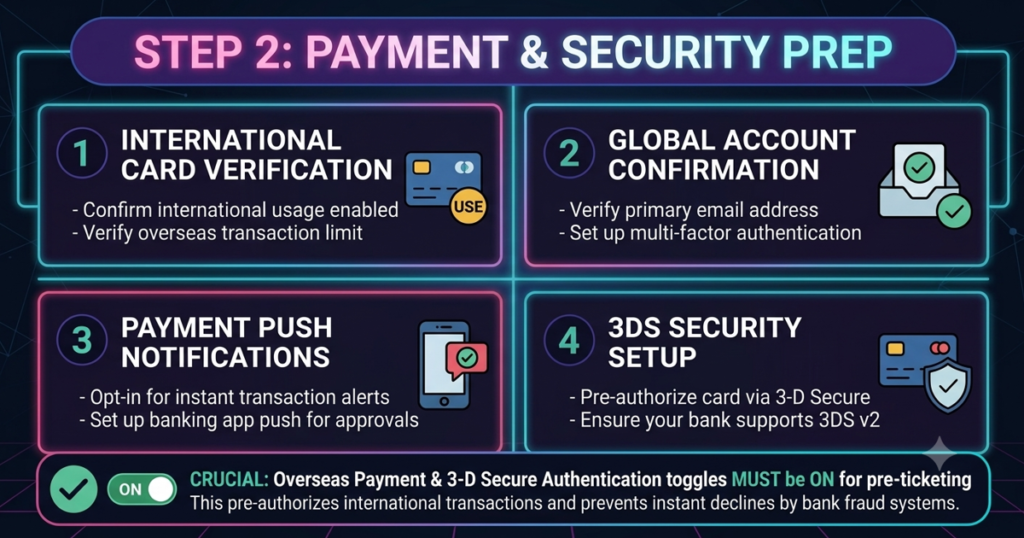
Card Security Preparation: Call your issuing bank or check your banking app to confirm that international e-commerce and 3-D Secure authentication (e.g., Visa Secure, Mastercard Identity Check) are fully enabled.
Make sure your 3DS authentication method—SMS OTP, banking app prompt, or push notification—is accessible from the same device you will use for ticketing.
Enabling overseas transaction toggles and 3-D Secure authentication in mobile banking
Step 3: T-Minus 30 Minutes Prep
Decide on your target show date, session, primary seat section, and a couple of backup sections in advance.
Disable Pop-Up Blockers: NOL World’s seat map and payment windows frequently open inside pop-up overlays. Turn off all ad-blockers and pop-up blockers in your web browser before the sale begins.
Log into your NOL World account 15–30 minutes before ticket opening.
Open the official event details page.
Crucial Queue Rule: Once the countdown hits zero and you enter the virtual waiting room, do not refresh the page, do not open multiple tabs, and do not log in from several devices simultaneously. Doing so can invalidate your session or reset your position to the back of the queue.
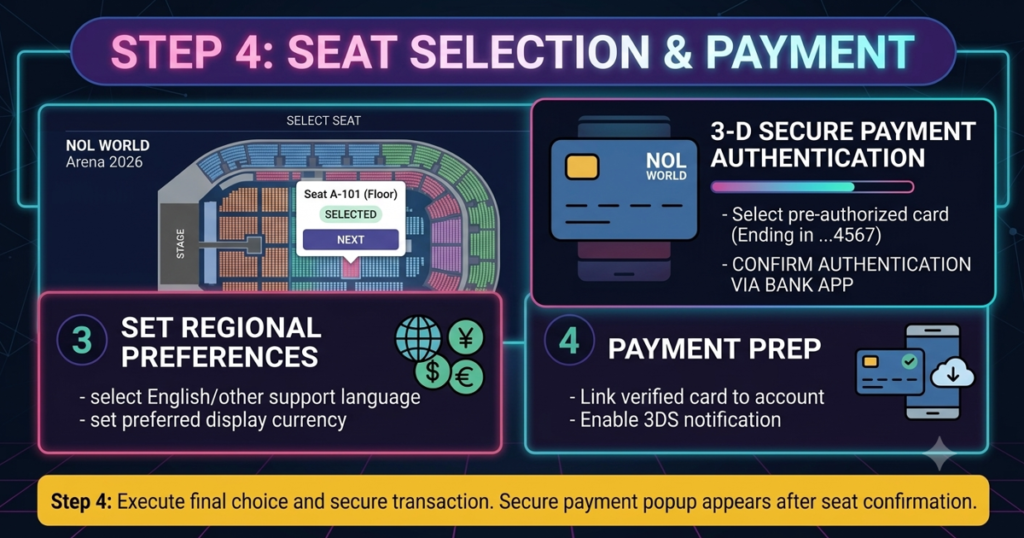
Step 4: Seat Selection & Payment Execution
The moment the ticketing system opens, select your preferred date and time slot.
Enter the interactive seat map, select your available seat(s), and move to the quantity screen before the session timer runs out.
Choose your fulfillment method. Overseas buyers on NOL World are usually routed to Will Call / On-Site Venue Pickup—always verify delivery terms listed on the event page.
Select your card type, enter your details, and immediately complete the 3-D Secure authorization step.
Once the transaction completes, record the booking/reservation number displayed on screen.
Confirm you have received the automated confirmation email, then check My Page > Booking History on NOL World to verify your status displays “Confirmed.”
Interactive seat selection map and 3-D Secure payment window for NOL World ticketing
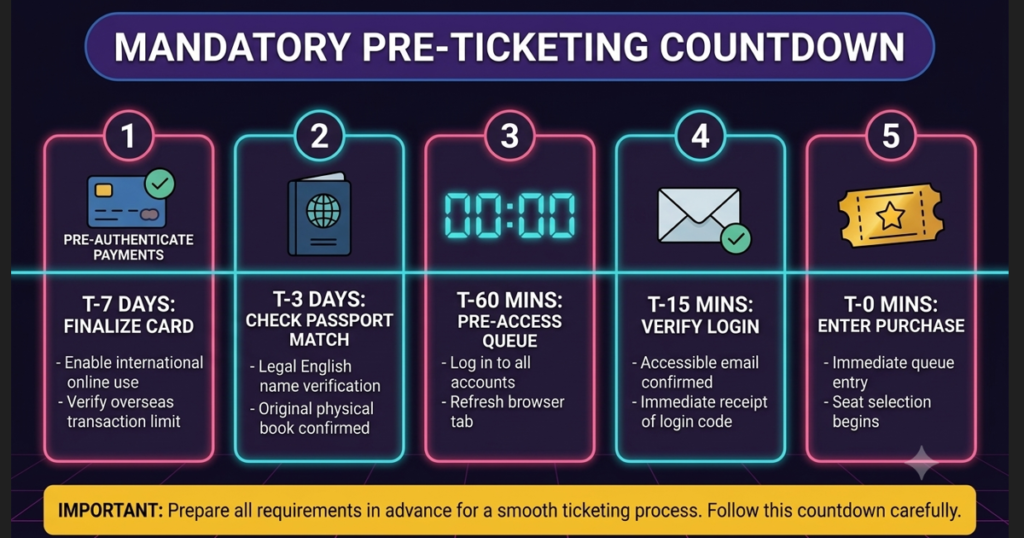
Ticketing Day Countdown Matrix
Timeframe
Action Required
Critical Focus
T-7 Days
Create/verify NOL World account
Audit profile name against physical passport MRZ
T-3 Days
Authorize 3-D Secure with bank
Confirm Fanclub presale linkage status
T-60 Mins
Browser & network preparation
Disable pop-up/ad blockers; verify stable network
T-15 Mins
Account login & page setup
Log in to world.nol.com; open target event page
T-0 Mins
Queue entry & execution
DO NOT refresh or duplicate tabs once queued
Step-by-step countdown timeline highlighting critical actions from T-7 days down to T-0 for successful K-pop ticketing
Step 5: Concert Day Execution
Bring printed or digital copies of your booking confirmation, reservation number, and your original physical passport.
Locate the designated NOL Ticket / Global Ticket on-site booth at the venue. Check booth operating hours on the event page and arrive early to avoid long lines.
Present your physical passport and reservation details to staff. Expired passports, photocopies, printed scans, and mobile screenshots are universally rejected.
※Now you are 100% ready! Click below to access the official NOL World ticketing platform and secure your tickets:
Even seasoned buyers run into trouble during high-stress K-pop ticket sales. Here are five common pitfalls foreign fans face, along with practical fixes.
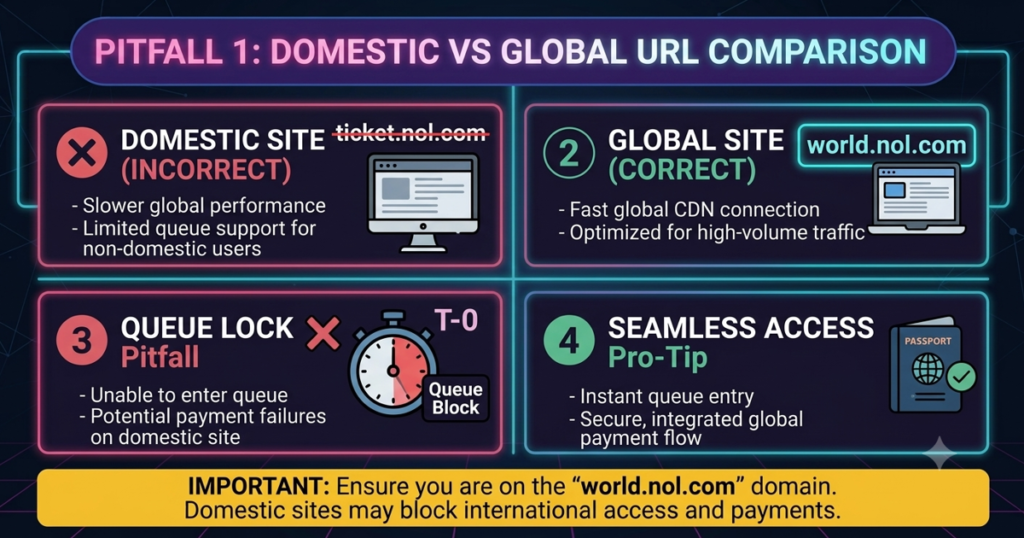
Pitfall 1: Attempting to Purchase via the Domestic Site
Root Cause: International fans sometimes accidentally enter the domestic NOL Ticket portal. Domestic pages require local phone verification (K-PASS/i-PIN) and Korean payment methods (KakaoPay, Toss, local bank transfers), which do not function for non-residents.
Solution: Always confirm your browser URL reads world.nol.com. If an event is not listed on NOL World, do not resort to borrowed domestic accounts, unauthorized middleman services, or proxy buyers—these violate strict venue identity checks. Check official promoter announcements for designated global partners instead.
Comparison layout contrasting the domestic ticketing site with the correct global NOL World platform
Root Cause: Overseas card issuers frequently flag rapid international transactions as potential fraud. Pop-up blockers can also prevent the 3DS verification window from opening, or OTP codes may arrive too late, causing session timeouts.
Solution:
Notify your card issuer of upcoming purchases in South Korea.
Test your card with a small international online transaction beforehand.
Keep a secondary card from a different bank or network on standby.
If a payment fails, check My Page immediately to rule out a duplicate charge before returning to seat selection when the timer resets.
Pitfall 3: Name Mismatches Between Passport and Ticket Account
Root Cause: Users often omit middle names, make typos, use social media pseudonyms, or swap first and last names during account creation.
Solution: Audit your profile well before ticket opening, checking every character against the Machine Readable Zone (MRZ) of your passport. If you spot an error after booking, contact NOL World customer service immediately—be aware that post-purchase name modifications are heavily restricted to prevent illegal reselling.
Passport Name Matching Guide
Passport Full Name
Registered Account Name
Verification Status
Venue Pickup Outcome
SMITH JANE MARY
SMITH JANE MARY
EXACT MATCH
APPROVED (Ticket Issued)
SMITH JANE MARY
JANE SMITH
MISMATCH
REJECTED (Non-transferable)
SMITH JANE MARY
SMITH JANE
OMISSION
REJECTED (Middle name missing)
SMITH JANE MARY
JANEY SMITH
NICKNAME
REJECTED (Name mismatch)
Comparison card detailing pass and fail examples for passport name verification during venue ticket pickup
Pitfall 4: Assuming All Events Use Mobile QR Tickets
Root Cause: Fans accustomed to Western ticketing platforms often assume a digital QR code on their smartphone grants venue entry.
Solution: Assume on-site physical ticket collection is mandatory unless the event notice explicitly states otherwise. Check My Page post-booking to confirm whether your event uses physical pickup or app-based mobile entry. If physical pickup is specified, bring your original passport to the venue without exception.
Pitfall 5: Missing the Fanclub Verification Window
Root Cause: Fans buy an official global fan club membership but assume membership alone grants presale access.
Solution: Fanclub presales on NOL World almost always require an explicit, multi-step verification process. Mark three separate dates on your calendar:
The deadline to join the Fanclub.
The window to register/link your Fanclub account on NOL World.
The official Fanclub Presale launch date and time.
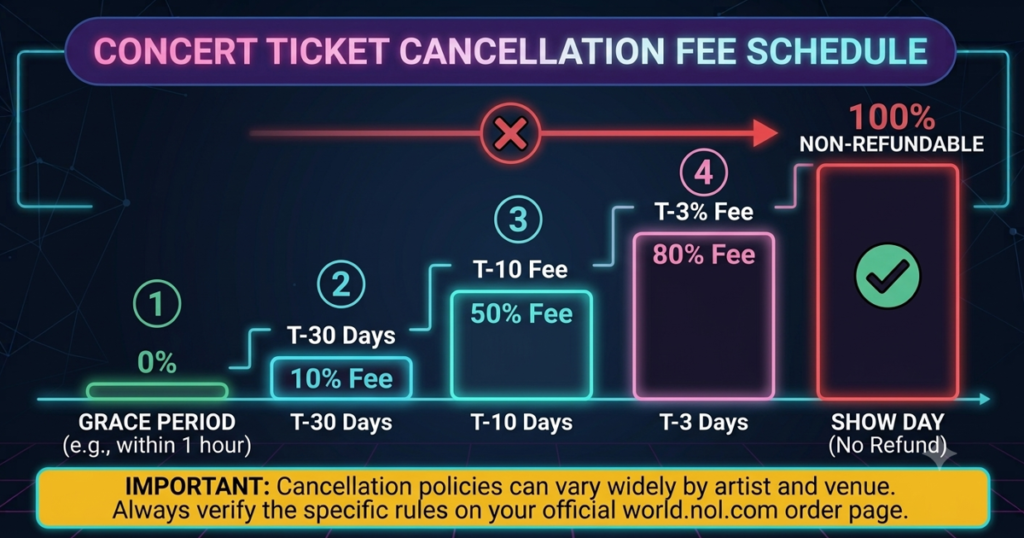
Understanding refund windows and venue rules protects your financial investment if your travel plans change unexpectedly.
Standard NOL World Cancellation Fee Schedule
Cancellation Timing
Fee / Penalty Structure
Refund Processing
Within 7 days of initial booking
No cancellation fee (Grace Period)
100% ticket price refunded
Day 8 until 10 days before show date
KRW 8,000 per ticket (Capped at 10% max)
Ticket price minus KRW 8,000
9 days to 7 days before show date
10% penalty fee applied
90% ticket price refunded
6 days to 3 days before show date
20% penalty fee applied
80% ticket price refunded
2 days to 1 day before show date
30% penalty fee applied
70% ticket price refunded
After Cutoff Time / Day of Performance
Non-refundable (0% refund)
Non-cancellable
*Note: System booking fees are strictly non-refundable once the initial grace period expires.
Visual timeline and step-by-step breakdown of concert ticket cancellation fees and refund rates on NOL World
On-Site Identification Rules
Primary Authority: Event-specific notices on the official show details page override general platform terms.
Strict ID Verification: To combat illegal ticket scalping, ticket booths at Korean venues rigorously enforce identity checks. The original buyer named on the NOL World account must be physically present.
Prohibited Identification: Photocopies, digital scans, smartphone photos, expired IDs, and proxy representation via friends or family are strictly prohibited.
Standard Cancellation & Refund Mechanics
Grace Period: Cancellations processed within 7 days of booking carry zero penalty fees, though initial system booking fees remain non-refundable.
Hard Cutoff Times: Ticket cancellations close at 17:00 KST on the day prior to the performance (or 11:00 AM KST if the performance occurs on a Sunday or Monday following a Saturday cutoff). Certain events forbid day-before cancellations entirely—always confirm exact timestamps on your checkout voucher.
Refund Processing: Approved refunds return automatically to your original payment card. Depending on your bank and card network, processing takes 5 to 7 business days.
Lost Tickets & Travel Packages
Lost or Damaged Tickets: Physical tickets issued at venue booths or delivered in advance cannot be reissued, canceled, or replaced under any circumstances if lost, stolen, or damaged. Treat physical paper tickets like cash.
Play & Stay / Travel Packages: Bundled ticket-and-hotel packages (e.g., official Play & Stay bundles) follow distinct, strict terms. Package components cannot be canceled individually, and many mandate a 100% penalty (zero refund) for cancellations within 3 days of the event or on show day.
5. Pro-Tips & Real-World Troubleshooting
Our editorial team compiled this battle-tested cheat sheet for navigating high-demand ticketing environments.
Conduct a dummy booking on a low-demand live event to test 3DS & pop-ups
3. Profile Accuracy
Address & Contact Pre-Fill
Ensure international phone codes and home addresses are fully saved
4. Pop-Up Defense
Browser Configuration Test
Disable all ad-blockers and whitelist world.nol.com popup windows
5. Seat Recycler
Monitor Canceled Ticket Returns
Check seat maps 24–48 hours post-sale and at penalty tier shift deadlines
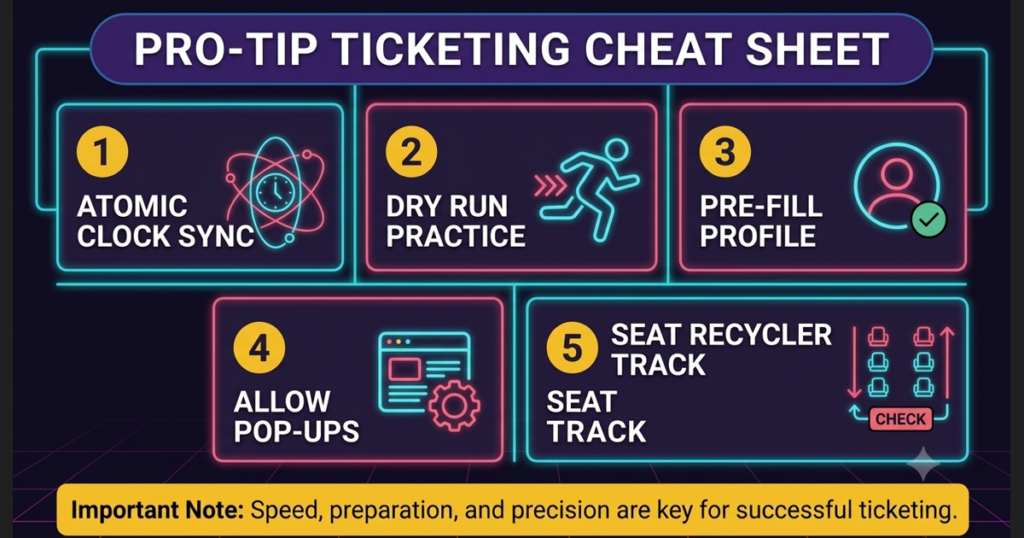
5 essential pro tips and tactical executions for successful K-pop concert ticketing on NOL World
Synchronize to Precise Korean Standard Time: Do not rely on your computer or phone’s auto-synced clock—local network latency can introduce a delay of several seconds. Use an online atomic time server set to South Korean Standard Time (KST) to track the exact millisecond ticket sales open.
Execute a “Dry Run” Practice Session: If you have never used NOL World, select an active, low-demand event currently on sale at world.nol.com. Walk through the booking sequence up to the final payment screen. This confirms your pop-up blockers are disabled and familiarizes you with the seat selection interface. (Cancel before entering payment details, or process a zero-penalty cancellation immediately after testing).
Understand Canceled Seat Releases (Ticket Recycling): If you miss out during the initial ticketing rush, do not lose hope. Unpaid reservations or canceled tickets are automatically recycled back into the inventory. Check the event seat map regularly over the following 24 to 48 hours, as well as immediately after major refund penalty tier shifts (e.g., 10 days prior to the event).
6. Frequently Asked Questions (FAQ)
Q1: Can I use a friend’s or family member’s credit card to pay for my ticket on NOL World?
A: Yes. You can generally use a payment card issued under another person’s name to complete checkout. The critical factor is the name registered on the NOL World account. On-site venue staff verify the original physical passport of the account holder attending the event, not the credit card used during online purchase.
Q2: What happens if I have a middle name on my passport but left it off when creating my NOL World account?
A: Middle name omissions are a leading cause of ticket pickup rejections at Korean venues. Global booth staff cross-reference account details against your physical passport MRZ letter-for-letter. If you spot an omission before show day, contact NOL World customer support immediately with proof of identity to request an official account profile amendment.
Q3: Why is the event I want visible on NOL Ticket, but missing entirely when I search on NOL World?
A: This indicates the event organizer has not allocated a global ticket quota for international buyers on world.nol.com. Domestic Korean ticketing pages require local identity verification (Korean resident details or domestic phone numbers) and local payment methods. If an event is absent from NOL World, check the promoter’s official announcements for an alternative international ticketing partner.
Q4: I successfully booked my ticket but never received a confirmation email. Is my booking secure?
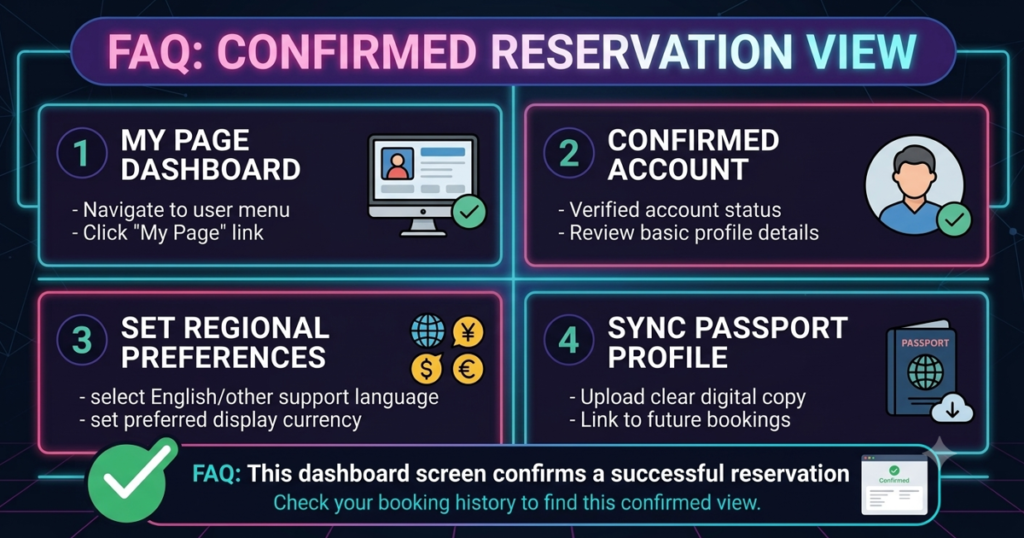
A: Email delivery can experience network delays or land in spam folders. A confirmation email alone does not guarantee entry—the definitive proof of purchase is your account history. Log into world.nol.com, navigate to My Page > Booking History, and verify your status reads “Confirmed” with a unique booking number. Screenshot and print this record for venue pickup.
Dashboard view showing confirmed reservation status in My Page Booking History
Summary Checklist for Ticket Day
[ ] Account Verified: Full legal name matches physical passport MRZ exactly.
[ ] Platform Confirmed: Event confirmed live on world.nol.com (NOL World Global).
[ ] Bank Notified: Payment card pre-authorized for overseas e-commerce & 3-D Secure.